Applying for a Jordan eVisa takes about 10-15 minutes online through the official MOI portal at eservices.moi.gov.jo. You fill in your personal details, upload a passport scan and photo, pay the fee by card, and receive your approved eVisa by email within a few days. No embassy visit is needed.
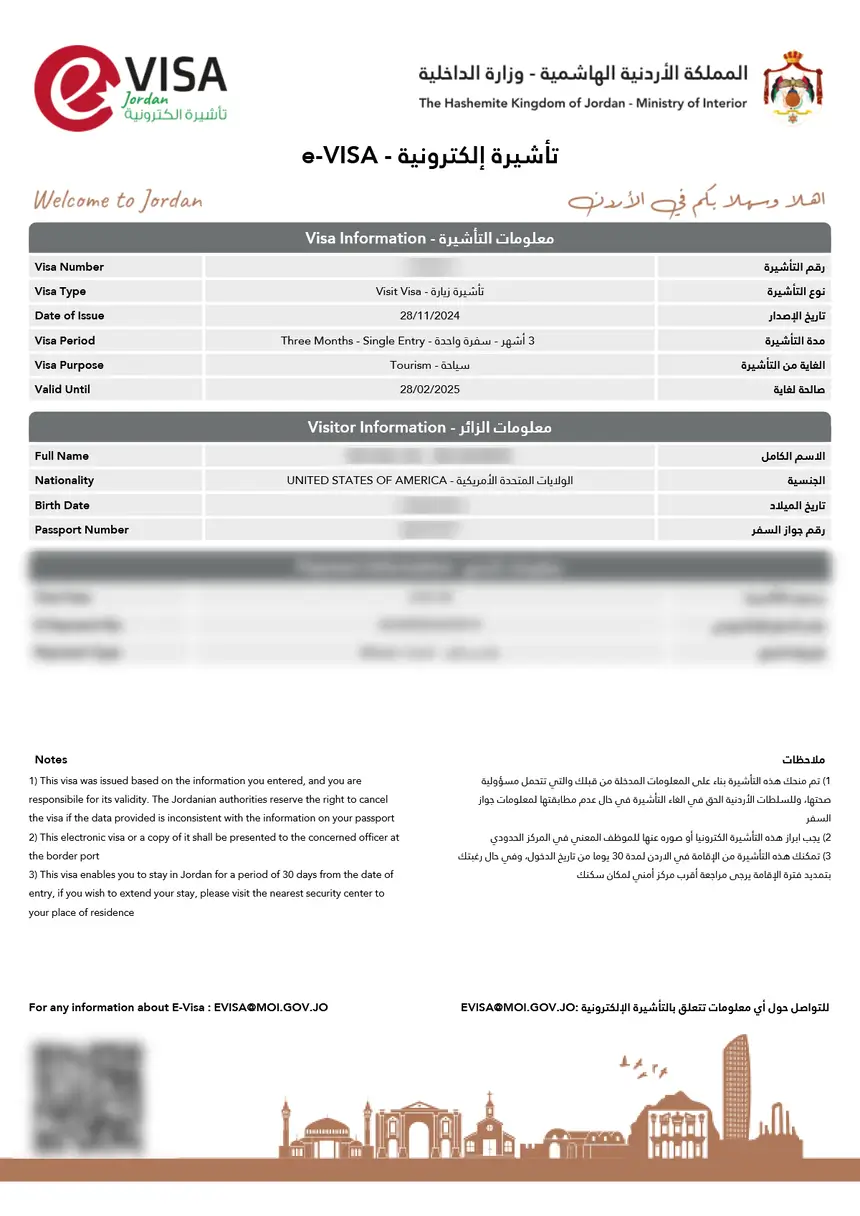
This step-by-step guide walks you through the entire Jordan eVisa application process – from creating your account to downloading the approved visa. Whether you are a first-time applicant or reapplying, follow each step below to avoid delays or rejections.
Before You Start: What You Need
Gather these items before opening the application portal. Having everything ready prevents timeouts and repeated sessions.
| Document / Item | Details |
|---|---|
| Valid passport | Must be valid for at least 6 months beyond your entry date, with 1-2 blank pages |
| Passport scan | Clear color scan of the biodata page (JPEG or PDF, under 2 MB) |
| Passport-style photo | Recent photo, white background, 3.5 x 4.5 cm, JPEG format |
| Email address | Active email to receive confirmation and the approved eVisa |
| Credit or debit card | Visa or Mastercard for paying the fee online |
| Travel dates | Approximate entry and exit dates for Jordan |
| Accommodation details | Hotel name and address in Jordan (or host contact info) |
If you do not yet have your travel dates finalized, you can still start the application – you will enter approximate dates. The eVisa is valid for 90 days from the date of issue, so apply at least 2 weeks before your trip.
For a complete list of documents, see our Jordan visa requirements guide.
Step 1: Create an Account on the MOI Portal
Go to the official Jordan Ministry of Interior eServices portal at eservices.moi.gov.jo. This is the only legitimate government site for Jordan eVisa applications – do not use third-party sites that charge extra fees.
- Click Register or Create Account on the homepage
- Enter your email address and create a strong password
- Verify your email by clicking the confirmation link sent to your inbox
- Log in with your new credentials
The registration process is straightforward. Make sure you use an email you check regularly, as all visa communications go to this address.
Step 2: Select Visa Type
Once logged in, navigate to the Visa Application section and select Tourist eVisa. Jordan offers several visa types:
- Single-entry tourist visa – valid for one entry, up to 30 days stay (40 JOD / ~$56 USD)
- Double-entry tourist visa – two entries within the validity period (60 JOD / ~$85 USD)
- Multiple-entry tourist visa – unlimited entries during validity (120 JOD / ~$170 USD)
Most travelers choose the single-entry visa. If you plan to visit Israel or another neighboring country and return to Jordan, opt for the double-entry or multiple-entry visa instead.
For details on all available visa types, visit our Jordan visa types guide.
Step 3: Fill In Personal Information
The application form asks for your personal details. Fill in every field accurately – mismatches between your form and passport can cause rejection.
Fields you must complete:
- Full name (exactly as shown on your passport)
- Date of birth
- Nationality / citizenship
- Passport number
- Passport issue and expiry dates
- Gender
- Place of birth
- Current address
- Phone number
- Email address
Double-check your passport number and name spelling. These are the two most common sources of errors. A single wrong digit or letter means your eVisa will not match your passport at the border.
Step 4: Enter Travel Details
In this section, provide your planned travel information:
- Purpose of visit: Select Tourism (most common)
- Entry date: Approximate date you plan to enter Jordan
- Exit date: Approximate departure date
- Port of entry: Queen Alia International Airport (AMM) is the most common; select land border if applicable
- Accommodation: Hotel name, address, and city in Jordan
If you are staying with friends or family, enter their address as the accommodation. You can list a hotel booking even if you have not confirmed it yet – the immigration officer at the border may ask about your accommodation, but the eVisa application itself does not require proof.
Step 5: Upload Documents
Upload the required documents in the specified formats:
Passport biodata page scan:
– Format: JPEG or PDF
– Maximum file size: 2 MB
– Must be a clear, full-color scan showing all text and the MRZ (machine-readable zone) at the bottom
Passport-style photo:
– Format: JPEG
– Size: 3.5 x 4.5 cm (passport standard)
– White background, no glasses, neutral expression
– Taken within the last 6 months
Tips for successful uploads:
– Use a scanner rather than a phone camera for the passport page
– Ensure no glare or shadows obscure any text
– Crop the photo to the correct dimensions before uploading
– If the upload fails, reduce the file size using an image compressor
Step 6: Review Your Application
Before proceeding to payment, the portal shows a summary of all entered information. Review every field carefully:
- Name matches passport exactly
- Passport number has no typos
- Dates are in the correct format
- Email address is correct (this is where your eVisa will be sent)
You can go back and edit any section at this point. Once you proceed to payment, changes become harder to make.
Step 7: Pay the Visa Fee
The portal accepts Visa and Mastercard credit or debit cards. The fee depends on your selected visa type:
| Visa Type | Fee (JOD) | Fee (USD approx.) |
|---|---|---|
| Single-entry (30 days) | 40 JOD | $56 |
| Double-entry | 60 JOD | $85 |
| Multiple-entry | 120 JOD | $170 |
Enter your card details on the secure payment page. The transaction processes immediately, and you will receive a payment confirmation by email.
Important: The fee is non-refundable even if your application is rejected. Make sure all information is correct before paying.
If you hold a Jordan Pass, the visa fee is waived – you only pay the Jordan Pass price (70-80 JOD), which also covers entry to 40+ tourist attractions.
Step 8: Wait for Processing
After payment, your application status changes to Submitted. Processing typically takes:
- Standard processing: 5-10 business days
- Peak season: Up to 14 business days (summer months, holidays)
You can check your application status at any time by logging into the portal. For more details on processing times, see our Jordan eVisa processing time guide.
Step 9: Receive and Download Your eVisa
Once approved, you will receive an email notification with your eVisa attached as a PDF. To download it:
- Log into the MOI portal
- Go to My Applications
- Find your approved application
- Click Download eVisa
Print the eVisa and carry it with your passport when traveling. While digital copies on your phone are accepted at some checkpoints, a printed copy is recommended as a backup.
The eVisa is valid for 90 days from the date of issue. You must enter Jordan within this validity window. Once you enter, you can stay for up to 30 days.
Step 10: At the Jordan Border
When you arrive in Jordan, present the following at immigration:
- Your valid passport
- Printed eVisa (or digital copy on your phone)
- Return flight ticket (may be requested)
- Proof of accommodation (hotel booking or host address)
The immigration officer will stamp your passport and grant entry for up to 30 days. If you need a longer stay, you can apply for a visa extension at a police station in Jordan before your visa expires.
Note about King Hussein (Allenby) Bridge: If entering via the Allenby Bridge crossing from Israel/West Bank, you cannot get a visa on arrival and must have your eVisa arranged in advance. This is the only major crossing point where visa on arrival is not available.
Common Mistakes That Cause Rejection
Avoid these frequent errors that lead to Jordan eVisa application rejections:
- Passport validity less than 6 months from entry date – check your expiry before applying
- Name mismatch between application and passport (including middle names)
- Blurry or unreadable passport scan – the MRZ code at the bottom must be legible
- Wrong photo dimensions – use 3.5 x 4.5 cm with white background
- Expired email address or one you do not check – you will miss the approval notification
- Incorrect passport number – even one wrong digit causes a rejection
- Applying too late – submit at least 2 weeks before travel to allow for processing delays
If your application is rejected, you can reapply after correcting the issue. The rejection email typically states the reason. You will need to pay the fee again for a new application.
Jordan Pass Alternative
Before applying for the eVisa, consider whether the Jordan Pass is a better option for your trip. The Jordan Pass costs 70-80 JOD and includes:
- Waived visa fee (saves 40 JOD on single-entry)
- Free entry to 40+ attractions including Petra, Wadi Rum, and Jerash
- Must be purchased before arrival and requires a minimum 3-night stay
For most tourists planning to visit Petra and other attractions, the Jordan Pass is the better value. Compare the two options in our Jordan Pass vs eVisa comparison.
FAQs About Applying for Jordan eVisa
How long does it take to get a Jordan eVisa?
Standard processing takes 5-10 business days. During peak travel season (June-September), it can take up to 14 business days. Apply at least 2 weeks before your trip to be safe.
Can I apply for a Jordan eVisa on arrival?
No, the eVisa must be obtained online before travel. However, many nationalities can get a regular visa on arrival at Queen Alia International Airport and most land borders. The Allenby Bridge crossing is the exception – no visa on arrival is available there.
How much does a Jordan eVisa cost?
A single-entry tourist eVisa costs 40 JOD (~$56 USD). Double-entry is 60 JOD (~$85 USD), and multiple-entry is 120 JOD (~$170 USD). If you have a Jordan Pass, the visa fee is waived.
What happens if my Jordan eVisa application is rejected?
You will receive an email with the reason for rejection. Common causes include passport validity issues, name mismatches, or poor document scans. You can reapply after fixing the issue, but you must pay the fee again.
Do I need to print my Jordan eVisa?
Printing is recommended as a backup. While digital copies on your phone are accepted at some immigration checkpoints, a printed copy ensures you are covered if electronic systems are down or if the officer requests a physical copy.
Can I extend my Jordan eVisa beyond 30 days?
Yes, you can apply for an extension at a police station in Jordan before your visa expires. Extensions are typically granted for an additional 30 days. Overstaying without an extension results in fines.
Is the Jordan eVisa fee refundable if I cancel my trip?
No, the eVisa fee is non-refundable once the application is submitted and payment is processed, regardless of whether you use the visa or not.
Which nationalities can apply for a Jordan eVisa?
The Jordan eVisa is available to citizens of most countries. Some nationalities are visa-exempt and do not need any visa. Check the [Jordan visa policy page](https://evisa-jordan.info/jordan-visa-policy/) for your specific nationality’s requirements.