
You can check your Jordan eVisa application status at any time by logging into the official MOI portal at eservices.moi.gov.jo. The portal shows whether your application is submitted, under review, approved, or rejected. Most applicants receive a decision within 5-10 business days.
This guide explains exactly how to track your Jordan eVisa application, what each status means, and what to do if your application is delayed or denied.
How to Check Your Jordan eVisa Status
Follow these steps to check the current status of your Jordan eVisa application:
- Go to eservices.moi.gov.jo – the official Jordan Ministry of Interior portal
- Log in with the email and password you used during your application
- Navigate to My Applications or Application Status
- Your current application appears with its status and reference number
You can check your status as many times as you want. The portal updates in real time when your application moves to a new stage. No special tools or third-party services are needed – everything is handled through the official government website.
For a complete walkthrough of the application process itself, see our Jordan eVisa application guide.
What Each Application Status Means
The Jordan eVisa portal uses several status labels to indicate where your application stands:
| Status | Meaning | Next Step |
|---|---|---|
| Submitted | Application received and payment confirmed | Wait for review |
| Under Review | Documents and information being verified | Wait 3-10 business days |
| Approved | Visa granted and ready to download | Download and print your eVisa |
| Rejected | Application denied (reason provided) | Fix the issue and reapply |
| Additional Info Required | Missing documents or clarification needed | Upload requested documents |
Most applications reach “Approved” status within 5-10 business days. If your status has not changed after 14 business days, contact the MOI support team through the portal.
Understanding the Jordan eVisa Processing Timeline
After you submit your application and pay the fee, the processing timeline typically follows this pattern:
Day 1-2: Application Received
Your status changes to Submitted. The system confirms your payment and queues your application for review. You receive a confirmation email with your application reference number.
Day 3-7: Document Review
The status shifts to Under Review. Jordan’s immigration officials verify your passport information, photo, and travel details. They check that your passport has at least 6 months of validity beyond your intended entry date.
Day 5-10: Decision
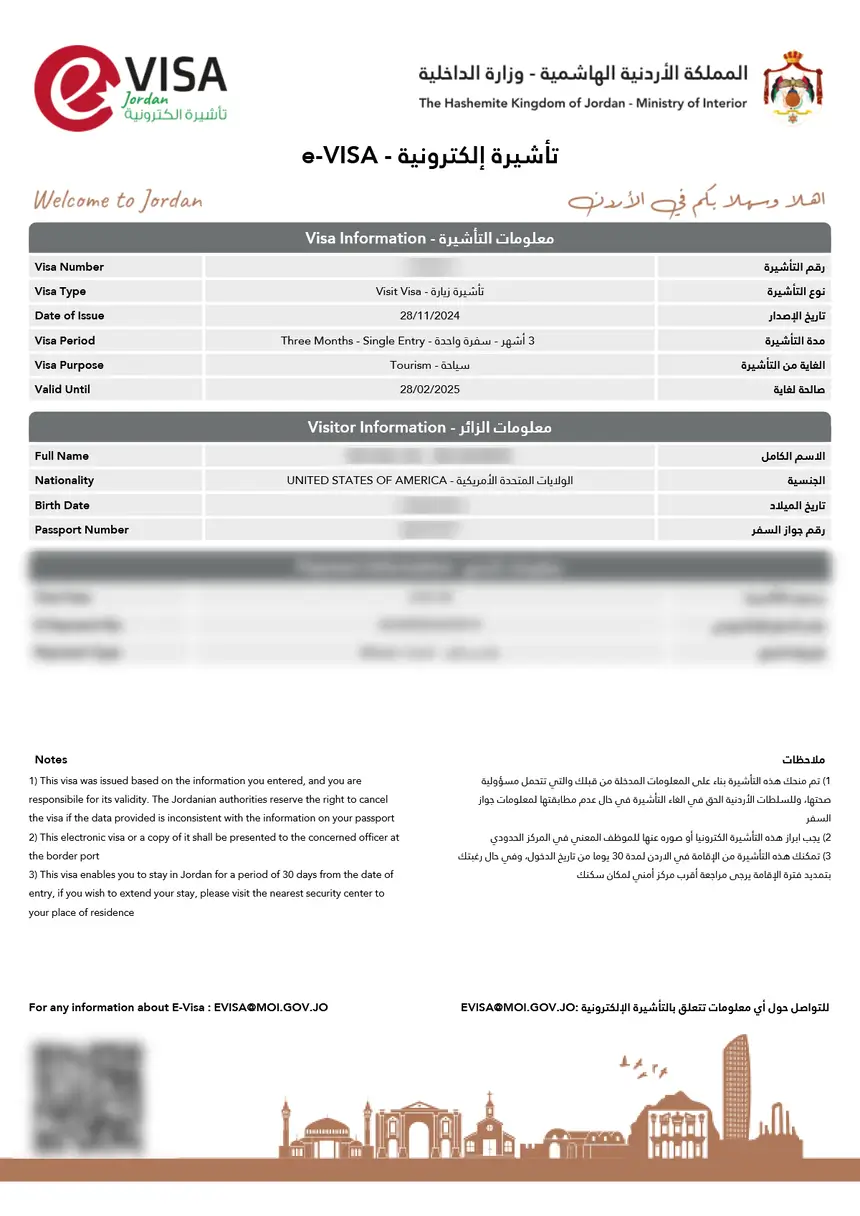
Your status updates to either Approved or Rejected. If approved, your eVisa PDF is available for download in the portal and sent to your email.
Peak Season Delays
During busy travel periods, processing can take longer:
| Season | Expected Processing Time |
|---|---|
| Off-peak (Nov-Feb) | 3-5 business days |
| Shoulder (Mar-May, Oct) | 5-7 business days |
| Peak (Jun-Sep) | 7-14 business days |
| Holiday periods | Up to 14 business days |
Apply at least 2-3 weeks before your travel date to account for possible delays.
How to Download Your Approved eVisa
Once your status shows Approved, download your eVisa immediately:
- Log into eservices.moi.gov.jo
- Go to My Applications
- Find your approved application
- Click Download eVisa or Print Visa
- Save the PDF file to your device
- Print at least 2 copies – one for your carry-on and one backup
The eVisa is valid for 90 days from the date of issue. You must enter Jordan within this window. Once you enter, you can stay for up to 30 days. If you need a longer stay, you can apply for a visa extension at a police station in Jordan.
Why Is My Jordan eVisa Taking So Long?
If your application has been in Under Review status for more than 10 business days, several factors might be causing the delay:
- Peak travel season – Summer months (June through September) see the highest volume of applications
- Incomplete documents – Blurry passport scans or incorrectly sized photos require manual review
- Name discrepancies – Differences between your application and passport data trigger additional verification
- Security screening – Some nationalities undergo additional background checks
- Public holidays – Jordanian government holidays pause all processing
What to Do If Your Application Is Delayed
If your Jordan eVisa has been pending for more than 14 business days:
- Check your email (including spam/junk folders) for any requests for additional information
- Log into the portal and verify no additional documents are required
- Contact the MOI eServices support through the portal’s help section
- As a last resort, contact the nearest Jordanian embassy or consulate
Do not submit a second application while your first one is still being processed. Duplicate applications can cause confusion and delays.
Jordan eVisa Application Rejected: What to Do
If your status changes to Rejected, the portal or email will state the reason. Common rejection reasons include:
| Rejection Reason | How to Fix |
|---|---|
| Passport validity less than 6 months | Renew your passport before reapplying |
| Name mismatch with passport | Ensure your name matches exactly, including middle names |
| Blurry or unclear passport scan | Submit a new, high-resolution color scan |
| Incorrect passport number | Double-check every digit before resubmitting |
| Wrong photo format or dimensions | Use 3.5 x 4.5 cm JPEG with white background |
| Duplicate application | Wait for the first application to complete before reapplying |
| Ineligibility for eVisa | Apply through a Jordanian embassy instead |
After correcting the issue, you can submit a new application. You will need to pay the eVisa fee again – the original payment is non-refundable.
For a full list of requirements, see our Jordan eVisa requirements guide.
How to Check eVisa Status Without Logging In
There is no official way to check your Jordan eVisa status without logging into the MOI portal. Unlike some countries that offer email-only status checks, Jordan requires portal authentication for security reasons.
If you forgot your password:
- Go to eservices.moi.gov.jo
- Click Forgot Password
- Enter your registered email
- Check your email for a reset link
- Create a new password and log in
If you no longer have access to the email you used during registration, you will need to contact the MOI support team to update your account details.
Key Information Visible in the Portal
When you log into the eVisa portal, your application dashboard shows:
- Application reference number – unique identifier for your submission
- Visa type – single-entry, double-entry, or multiple-entry
- Current status – Submitted, Under Review, Approved, or Rejected
- Submission date – when you completed your application
- Payment status – confirmed or pending
- Download link – appears once your visa is approved
Keep a note of your application reference number. You may need it when contacting support or when presenting your eVisa at the Jordan border.
Checking Jordan eVisa Status at the Border
When you arrive in Jordan, the immigration officer verifies your eVisa electronically. You should carry:
- Your valid passport
- A printed copy of your approved eVisa
- Return or onward flight ticket
- Proof of accommodation in Jordan
The officer scans your passport and cross-references it with the approved eVisa database. If your eVisa status shows Approved in the system, you receive an entry stamp.
Important for Allenby Bridge crossings: If you are entering Jordan via the King Hussein (Allenby) Bridge from Israel or the West Bank, you must have your eVisa approved before arrival. Visa on arrival is not available at this crossing, and the officer will check your eVisa status electronically.
eVisa vs Jordan Pass: Status Tracking Differences
If you purchased a Jordan Pass instead of applying for an eVisa separately, the tracking process is different:
| Feature | eVisa | Jordan Pass |
|---|---|---|
| Where to check status | eservices.moi.gov.jo | jordanpass.jo |
| Processing time | 5-10 business days | Instant to 24 hours |
| Visa fee | 40-120 JOD | Included (70-80 JOD) |
| Additional benefits | None | Entry to 40+ attractions |
| Status tracking method | Portal login | Portal login + email |
| Download format | PDF eVisa | PDF pass with QR code |
The Jordan Pass processes much faster than a standalone eVisa because it is a tourism product rather than a visa application. However, both require you to present documentation at the border and go through immigration.
FAQs About Jordan eVisa Status Check
How do I check my Jordan eVisa status online?
Log into the official MOI portal at eservices.moi.gov.jo using the email and password you created during application. Navigate to “My Applications” to see your current status. No third-party tools are needed.
How long does it take to get a Jordan eVisa approved?
Standard processing takes 5-10 business days. During peak travel season (June through September), it can take up to 14 business days. Off-peak applications are often approved within 3-5 business days.
What does “Under Review” mean for my Jordan eVisa?
“Under Review” means your application has been assigned to an immigration officer who is verifying your documents, passport information, and travel details. This is the normal processing stage and does not indicate a problem.
Can I track my Jordan eVisa by passport number only?
No, you need to log into the MOI portal with your registered email and password. There is no public status check tool that works with just a passport number.
Why is my Jordan eVisa status not updating?
The portal updates in real time when your status changes. If you do not see an update, your application is likely still being processed. Wait at least 10 business days before contacting support. Check that you are looking at the correct application if you have multiple submissions.
What happens if my Jordan eVisa is rejected after I already booked flights?
Your eVisa fee is non-refundable, and flight bookings are separate from the visa process. If rejected, identify the reason, correct the issue, and reapply. If time is short, contact a Jordanian embassy for faster processing options.
Can someone else check my eVisa status for me?
The portal requires personal login credentials. You can share your login details with a trusted person, but for security reasons, it is better to check your own status. Travel agents who applied on your behalf should have access through their own portal accounts.
Is there a mobile app to check Jordan eVisa status?
The Jordan MOI offers a mobile app for eServices. You can use it to check your application status, download your approved eVisa, and manage your account. The app is available for both Android and iOS devices.
What should I do if I never received a confirmation email after applying?
Check your spam or junk mail folder first. If you still cannot find it, log into the portal directly at eservices.moi.gov.jo – your application will be visible there regardless of whether the email arrived. Verify your email address in your account settings.
Can I check the status of a Jordan visa on arrival?
Visa on arrival is processed at the border in real time and does not have a pre-arrival status tracking system. If you want to pre-arrange your visa use the eVisa system at eservices.moi.gov.jo which allows full status tracking before you travel.